
[Kubeflow] Kubeflow 공부기 : Kubeflow on EKS - 설치 중 발생한 이슈 사항 정리

Kubeflow 설치는 문서만 따라가면 되는 줄 알았는데, 막상 EKS 환경 위에 올리다보니 생각보다 많은 부분에서 막혔습니다😥 EKS에 Kubeflow를 설치하면서 실제로 마주쳤던 문제들과, 그걸 어떻게 해결했는지 기록 위주로 간단히 정리해보고자 합니다.
☁ 사용 환경
- AWS EKS (1.32)
- Kubeflow v1.9.1
1. pod 수 제한으로 인한 Pending
설치 직후 일부 컴포넌트가 Pending상태로 남아있었습니다.
describe로 확인해보니 `0/3 nodes are availabe: insufficient pods` 메시지를 확인 할 수 있었습니다.
📌 원인
EKS에서는 노드당 생성 가능한 최대 Pod수가 고정값으로 제한이 되어 있었습니다.
(이 제한은 ENI수와 서브넷당 IP개수에 기반합니다.)
Pod를 더 띄우고 싶어도 노드 1개에 붙을 수 있는 IP가 부족해서 Pending 상태로 남아있던 것이었습니다.
✅ 해결 방법
기존 노드 개수 1개에서 3개로 늘려주어 Pod 수 제한을 해소했습니다.
instance_types = ["t3a.2xlarge"]
min_size       = 1
max_size       = 3
desired_size   = 3
2. pvc 생성 안됨
일부 Kubeflow 컴포넌트가 PVC를 생성하지 못하고 계속 Pending 상태로 머물러 있었습니다.
로그와 상태를 보면 다음과 같은 현상이 반복되고 있었습니다.
no storage class provided, and no default storage class available
📌 원인
Kubernetes에서는 PVC를 만들때, StrorageClassName을 명시하지 않으면 default StorageClass를 찾아 사용합니다.
EKS에선 gp2가 기본으로 생성됩니다 그럼에도 PVC가 Pending 상태로 남아있는 이유는:
- EBS CSI Driver가 제대로 설치되지 않았거나
- 해당 드라이버의 ServiceAccount에 IAM 권한이 누락되어 있었기 때문입니다.
✅ 해결 1 : EBS CSI Driver
EBS CSI Driver는 EKS에서 추가 기능(Adds On)으로 제공하니 설치를 진행해주면 됩니다.
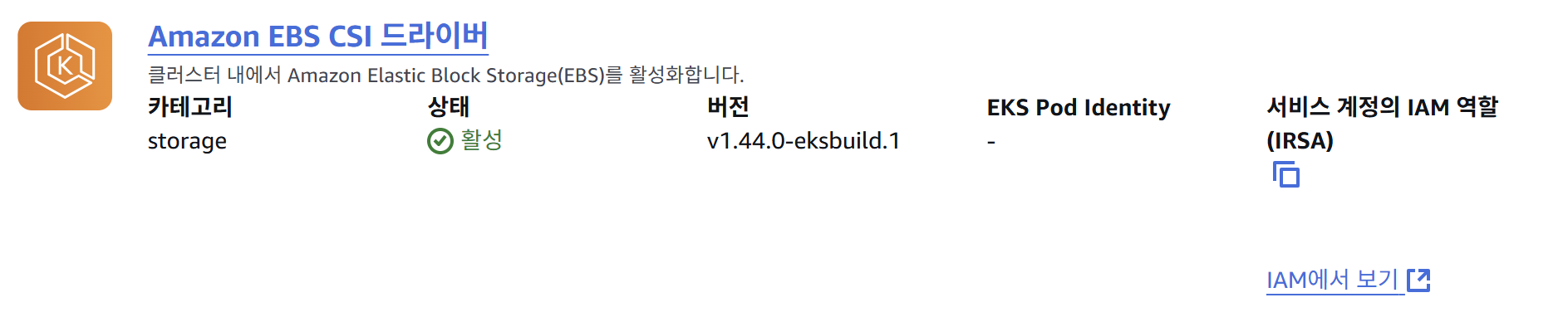
해당 드라이버를 설치 후 실제로 볼륨 프로비저닝에 사용하기 위해선 storage class의 `provisioner`에 `ebs.csi.aws.com`이 설정되어있어야 하기 때문에, 저는 sc를 따로 배포해주었습니다.
apiVersion: storage.k8s.io/v1
kind: StorageClass
metadata:
  name: gp3
  annotations:
    storageclass.kubernetes.io/is-default-class: "true"  # 기본 StorageClass로 설정
provisioner: ebs.csi.aws.com
allowVolumeExpansion: true
volumeBindingMode: WaitForFirstConsumer
reclaimPolicy: Delete
parameters:
  type: gp3
  fsType: ext4
테라폼으로는 다음과 같이 배포가 가능합니다.
resource "kubernetes_storage_class" "gp3" {
  metadata {
    name = "gp3"

    annotations = {
      "storageclass.kubernetes.io/is-default-class" = "true"
    }
  }
  storage_provisioner = "ebs.csi.aws.com"

  reclaim_policy      = "Delete"
  volume_binding_mode = "WaitForFirstConsumer"

  parameters = {
    type   = "gp3"
    fsType = "ext4"
  }
  allow_volume_expansion = true
}
✅ 해결 2 : IAM Role for ServiceAccount (IRSA) 연결
Driver를 설치하면 PVC가 Volume을 프로비저닝 하려고 시도하는데요 여전히 에러가 나서 확인을 해보니,
createvolume 권한 없어 EBS를 생성하지 못합니다.
ebs driver의 service account를 확인해보면 role arn이 안붙어있습니다.
# -o yaml로 확인했을 때 annotation이 보이지 않음

apiVersion: v1
kind: ServiceAccount
metadata:
  name: ebs-csi-controller-sa
  namespace: kube-system
driver에서 AWS API를 호출 할 수 있도록 iam role를 생성 후 service account에 attach 해야 합니다.
1️⃣ eksctl을 이용한 설정
eksctl create iamserviceaccount \
 --name ebs-csi-controller-sa \
 --namespace kube-system \
 --cluster <your-cluster-name> \
 --attach-policy-arn arn:aws:iam::aws:policy/service-role/AmazonEBSCSIDriverPolicy \
 --approve \
 --override-existing-serviceaccounts \
 --role-name AmazonEKS_EBS_CSI_DriverRole \
 --region us-west-1
명령어를 실행 후 sa를 확인했을 때 다음과 같이 annotation에 role arn이 붙어있어야 합니다.
apiVersion: v1
kind: ServiceAccount
metadata:
  name: ebs-csi-controller-sa
  namespace: kube-system
  annotations:
    eks.amazonaws.com/role-arn: arn:aws:iam::***:role/ebs-csi-irsa-role
pod는 role이 안붙어있는채로 생성됐으므로 다시 생성해줘야합니다.
kubectl rollout restart deployment ebs-csi-controller -n kube-system
2️⃣ terraform에서 구성
저는 terraform으로 eks 클러스터를 생성하였기 때문에, terraform에서 해당 설정을 추가해주었습니다.
(irsa 롤 생성 후 -> adds on에서 iam 연결)
# IAM Role for IRSA (EBS CSI Driver)
module "ebs_irsa" {
 source  = "terraform-aws-modules/iam/aws//modules/iam-role-for-service-accounts-eks"
 version = "5.34.0"
 role_name = "ebs-csi-irsa-role"
 attach_ebs_csi_policy = true
 oidc_providers = {
   main = {
     provider_arn               = module.eks.oidc_provider_arn
     namespace_service_accounts = ["kube-system:ebs-csi-controller-sa"]
   }
 }
}
eks_managed_addons = {
aws-ebs-csi-driver = {
resolve_conflicts = "OVERWRITE"
service_account_role_arn = module.ebs_irsa.iam_role_arn # ✅ IRSA 연결
}
}
3. istio 사이드카 Webhook 에러 - timeout
일부 deploy가 0/1 상태로 장시간 멈춰있어 로그를 확인해보니 멈춰있는 deploy에서 다음과 같은 공통적인 에러가 발생했습니다.
13m         Warning   FailedCreate              replicaset/autoscaler-78497cfccf             Error creating: Internal error occurred: failed calling webhook "namespace.sidecar-injector.istio.io": failed to call webhook: Post "https://istiod.istio-system.svc:443/inject?timeout=10s": context deadline exceeded
13m         Warning   FailedCreate              replicaset/activator-6cb5478db               Error creating: Internal error occurred: failed calling webhook "namespace.sidecar-injector.istio.io": failed to call webhook: Post "https://istiod.istio-system.svc:443/inject?timeout=10s": context deadline exceeded
13m         Warning   FailedCreate              replicaset/net-istio-controller-85d7bcd67c   Error creating: Internal error occurred: failed calling webhook "namespace.sidecar-injector.istio.io": failed to call webhook: Post "https://istiod.istio-system.svc:443/inject?timeout=10s": context deadline exceeded
13m         Warning   FailedCreate              replicaset/controller-7f65fff8bf             Error creating: Internal error occurred: failed calling webhook "namespace.sidecar-injector.istio.io": failed to call webhook: Post "https://istiod.istio-system.svc:443/inject?timeout=10s": context deadline exceeded
13m         Warning   FailedCreate              replicaset/net-istio-webhook-5bf6888b6b      Error creating: Internal error occurred: failed calling webhook "namespace.sidecar-injector.istio.io": failed to call webhook: Post "https://istiod.istio-system.svc:443/inject?timeout=10s": context deadline exceeded
13m         Warning   FailedCreate              replicaset/webhook-854d954698                Error creating: Internal error occurred: failed calling webhook "namespace.sidecar-injector.istio.io": failed to call webhook: Post "https://istiod.istio-system.svc:443/inject?timeout=10s": context deadline exceeded
처음엔 Istio 버전 호환성 문제인가 싶었는데, 사실은 EKS 보안 그룹 간 트래픽이 차단되어 있었던게 원인이였습니다.
📌 원인
Kubeflow에서 Pod가 생성될 때, istio는 sidecar-injector-webhook이라는 걸 통해 `istio-proxy` 컨테이너를 자동으로 주입합니다.
그런데 이 Webhook 호출은 Kubernetes 내부에서 다음과 같은 구조로 네트워크 요청을 발생시킵니다.
[API Server] -(HTTPS, 443)-> [istio-system service] -> [istiod Pod]
즉, Webhook은 실제로 API 서버 -> istiod 서비스 -> 해당 노드의 istiod Pod 순으로 들어갑니다.
EKS 구조 상 이 요청은 보안 그룹의 통과가 필요합니다.
- API 서버는 EKS Control Plane에 있고
- istiod는 워커 노드 위에 올라가 있음
- API 서버 -> istiod 서비스로 HTTPS 요청 시, 내부적으로 클러스터 보안그룹 -> 노드 보안 그룹 방향의 트래픽 발생
이걸 허용하지 않으면 API 서버가 istiod Pod에 HTTPS 요청을 보내지 못해 Webhook 에러가 발생합니다.
✅ 해결
API 서버의 클러스터 SG에서 노드 SG로 트래픽을 허용할 수 있도록 정책을 생성합니다.

테라폼으로는 다음과 같이 구성이 가능합니다.
resource "aws_security_group_rule" "sg_istio_in" {
  type                     = "ingress"
  from_port                = 0
  to_port                  = 0
  protocol                 = "-1" # all
  security_group_id        = module.eks.node_security_group_id
  source_security_group_id = module.eks.cluster_security_group_id
  description              = "Allow all traffic from cluster SG to node SG"
}
🧩 마무리
Kubeflow를 설치하면서 가장 크게 느낀건, 권한과 네트워크가 거의 절반 이상의 문제를 차지한다는 점입니다.
단순히 설치 스크립트를 따라 하는 걸로는 해결이 안되는 문제들이고, AWS 내부 동작을 어느 정도 이해하고 있어야하기 때문에또 열심히 공부를 해야겠다는 계기가 되었습니다 .. 😂
'🤖 AI' 카테고리의 다른 글
| [Kubeflow] Kubeflow 공부기 : 데브옵스 엔지니어의 MLOps 입문 (2) 구성요소와 Pipeline (0) | 2025.07.01 |
|---|---|
| [Kubeflow] Kubeflow 공부기 : 데브옵스 엔지니어의 MLOps 입문 (1) kubeflow 알아보고 설치하기 (1) | 2025.06.24 |
| [CrewAI] CrewAI 시작하기 (1) | 2024.11.19 |
| [CrewAI] CrewAI란? (0) | 2024.11.18 |
| [LLM] 체인(Chains) - 문서 체인 (0) | 2024.07.10 |